
Loxone Exosphere changelog
Alpha 2026.10.22
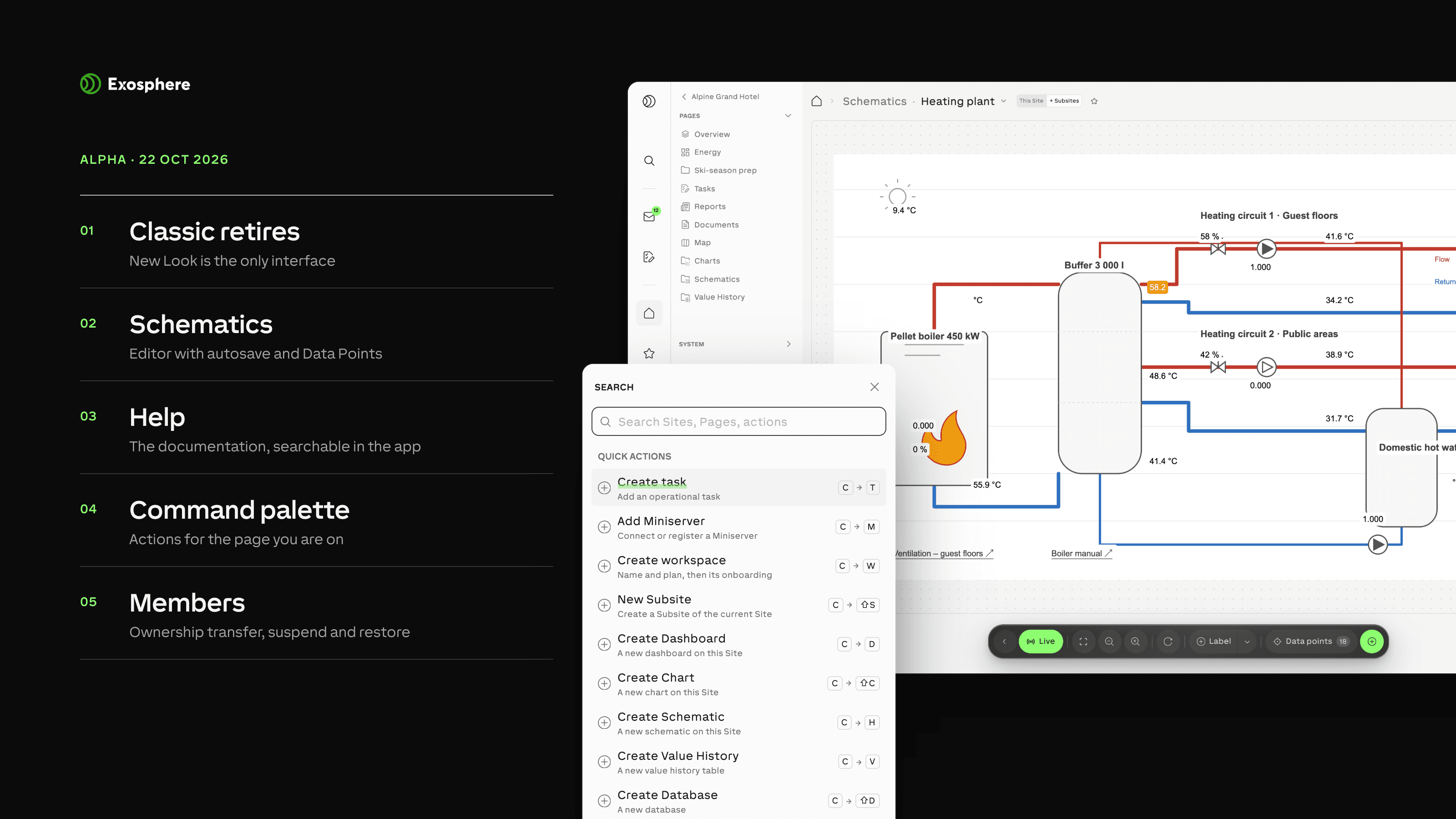
Features
EXO-6963 — Filter schematic link targets by Site and distinguish identical names by their Site path; only accessible schematics are offered.
EXO-6673 — Suspend eligible Workspace members while preserving their Site permissions, then restore their previous access on reactivation.
EXO-6964 — Adjust schematic text opacity independently from its background and retain it when changing colours.
EXO-6529 — When enabled for your Workspace, transfer ownership to a member who accepts before the change completes. Only that Workspace moves to their Organization; your access remains, and the new address is shown before confirmation. Old bookmarks and shared links stop working after transfer.
Improvements
EXO-7008 — Use consistent quotation marks in search messages and other interface text.
EXO-6966 — See overlapping schematic Value Map ranges and an explanation that endpoints are included and the first matching entry wins.
EXO-6904 — Save member permissions and group membership automatically, resend invitations and keep external-contact edits after failed saves.
EXO-6907 — Save invitation-link edits automatically, confirm deactivation and offer Undo before deletion.
EXO-6974 — Select a task’s status directly from a menu instead of cycling through statuses.
EXO-6982 — Keep new SVG schematic backgrounds sharp when zooming and show their stored dimensions; explain when a file cannot be used.
EXO-6987 — Show stable list and task-board loading previews without resizing or blank frames.
EXO-6918 — Show understandable Session and Transaction labels, an explanation and a working Type filter in Database tables and export filter summaries.
EXO-6942 — With the new command palette enabled, include tasks opened from boards, lists and Site pages in Recent; keep opened tasks in the address so a reload returns to them, and keep details open when deletion fails.
EXO-3740 — Automatically fit linear chart axes to the recorded value range so small variations remain visible.
EXO-6836 — Edit Site schematics with autosave, undo/redo, recovery after failed saves, a data-point side panel and Function Block search; retain saved views and add SVG backgrounds.
EXO-5715, EXO-6929 — Read updated New Look guides inside Help or on the public documentation pages, search their contents from Help and the command palette, and follow supported former documentation links.
EXO-6480 — Use New Look as the single application interface; compatible Classic bookmarks forward to it, and existing public sharing links keep working.
EXO-6926 — When enabled for your Workspace, find current-page actions first in the command palette, keep recent items across browsers, and get more relevant results from repeated choices.
Bug fixes
EXO-6912 — Keep dropdown selections visible, including the chosen license when extending a Miniserver license.
EXO-6955 — Recover Overview reads after an interrupted connection instead of immediately showing a network error.
EXO-6976 — Show neutral Function Block Set states as neutral in Status Overview.
EXO-6977 — Show the selected data point’s name in the chart header.
EXO-6986 — Use consistent paging in Needs attention and start at the top after changing pages or filters.
EXO-6991 — Explain when active alert rules are watching sources but no condition has been met, and offer to view those rules.
EXO-6999 — Show repeated failed Miniserver updates once in Needs attention; acknowledging the latest report no longer reveals older attempts.
EXO-7005 — Allow Organization owners to be added to Workspace groups and selected as notification recipients.
EXO-7013 — Keep Miniserver document names and actions readable on phones.
EXO-7014 — Prevent unwanted phone-browser zoom when opening search.
EXO-7021 — Give Function Block sidebar links consistent hover feedback.
EXO-7023 — Keep the task-board Done action fully visible.
EXO-7024 — Keep the Members Create action reachable on phones.
EXO-7027 — Open Share with Workspace help on press when creating or editing Function Block Sets.
EXO-7029 — Keep task-board column names and settings readable on phones.
EXO-7033 — Open Calendar in Day view on phones when no preference is saved, preserve the chosen view, and improve compact Month and Week views.
EXO-7035 — Keep Miniserver System Status badges and controls from overlapping on the phone Overview.
EXO-7001 — Prevent service stalls and repeated restarts during sign-in and session checks.
EXO-6968 — Choose the exact hour and minute in Value History and keep the selection after reloading.
EXO-6979 — Keep detail sheets visible while they close and animate newly opened records consistently.
EXO-6944 — Save Workspace name, default language and default timezone together, and retain edits if saving fails.
EXO-6971, EXO-7002 — Suggest another chart period when historical readings exist outside the selected range.
EXO-6972, EXO-6973 — Show task actions only where your Site permissions allow them and explain why administrators cannot remove their own Site access.
EXO-6336, EXO-6992 — Show task priority, status and source in Operations Center and Site Overview, with assignee names in wide lists.
EXO-6983, EXO-6984, EXO-6985, EXO-7000 — Open the list matching an Operations Center tile and filter Needs attention by labelled severity within the selected category.
EXO-6988 — Keep today’s elapsed backup, upgrade and report runs in Calendar; show missed policy runs as Skipped after the catch-up window without duplicating completed jobs.
EXO-6993, EXO-6994, EXO-6998, EXO-6995, EXO-6996 — Use consistent task and alert wording, Needs attention labels and event ages.
EXO-7004, EXO-6997, EXO-7003 — Explain when templates or documents do not match a search and make search messages consistent.
EXO-7009, EXO-7010 — Keep alert-source filter menus fully visible and notification recipients readable in dark mode.
EXO-6924 — Raise No data alerts for sensors that have never reported, keep counting across restarts, and alert separately for each silent Function Block Set member.
EXO-6614 — Show room-controller modes without temperature units while preserving units on actual and target temperatures.
EXO-6943 — Filter archived Inbox items together with type, read status and search while keeping the current Inbox view and its actions.
EXO-6945 — Restore task completion and reopening shortcuts.
EXO-6946 — Explain when a Site’s Miniservers lack map locations instead of saying the Site has no Miniservers.
EXO-6947 — Offer an error screen with Reload when an unexpected application failure would otherwise leave a blank screen.
EXO-6948 — Keep Database export details visible above Manage Exports.
EXO-6949 — Offer to add the missing Overview Page before choosing its sections during Site setup.
EXO-6950 — Show the current chart name in Site Page breadcrumbs after renaming and reloading.
EXO-5295 — Retry Miniserver configuration events after temporary service failures for up to ten minutes by default, reducing lost updates during short outages.
EXO-6954 — Keep the Workspace selector responsive when a favorite leads back to the Workspace landing page.
EXO-4732, EXO-5864 — Fix chart percentages for positive and negative values and honor saved Y-axis ranges for digital layers in mixed charts and dashboards.
EXO-6677, EXO-6678 — Show readable, consistent Alarm Function Block states and retain unchanged digital readings in widgets for up to one year.
EXO-6788, EXO-6794 — Fix Exosphere add-on cleanup when stopping management or deleting a Miniserver; keep it managed if cleanup cannot start.
EXO-6849 — Restore older SVG backgrounds in schematics.
EXO-6877 — Keep Site-code pairing progress and licensing limited to the selected Site.
EXO-6933 — Update Inbox lists after bulk archive, restore and read-state changes without requiring a reload.
EXO-6934, EXO-6937, EXO-6938 — Show readable report test-send errors, keep the page usable after failure, fit test-export buttons and avoid login-style autofill on webhook URLs.
EXO-6466, EXO-6931, EXO-6935, EXO-6940 — Keep System Status search focused, show only useful empty-state actions, display filter counts fully and prevent repeated timed-out searches.
EXO-6917 — Keep focus when editing invalid Database display formats and prevent shortcuts from opening filters behind a dialog.
EXO-6923 — Restore the panel shortcut and Show panel control on Inbox and Settings.
EXO-6932, EXO-6936 — Show complete task selection borders and place the Miniserver favorite star beside the breadcrumbs.